Installing Grisoft AVG
Anti-Virus Freeware Version
Page 4
Notice the icon in the top left hand edge of the image below, alongside the
word AVG.
After rebooting as mentioned on page 3, a similar looking icon will be found
in your System tray of your computer (bottom Right Hand side of the computers
screen).
Right click on this icon in the system tray.
Select the "Run AVG" option.
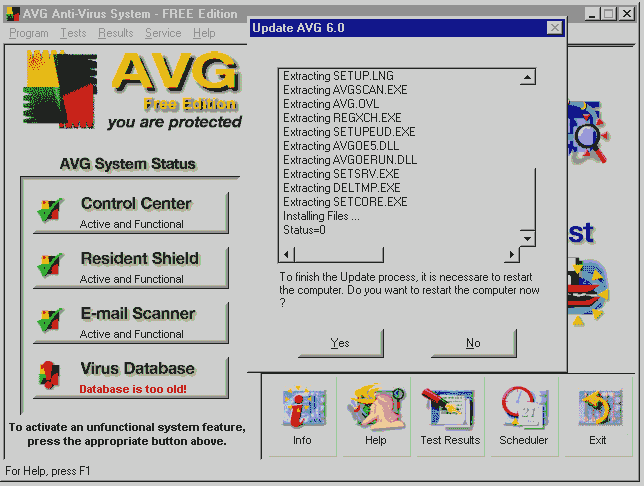
Notice that the "Virus Update" prompt indicates that the anti-virus
definition files are out of date.
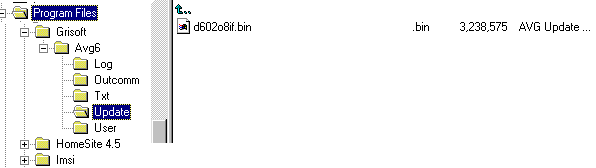
To correct this, copy the update directory from the cd into the Grisoft/Avg6
directory as indicated below.
Once done rerun the anti virus program as indicated above. (Right click on
the icon in the system tray).
This will cause the latest update to be extracted as indicated in the Right
Hand side of the above screen. Once finished, select the YES option, to allow
your pc to reboot.
Once the pc has rebooted, Right click on the AVG icon in the system tray, choose run option, then click on the "Run Complete Test". Leave the PC to complete this procedure (could take 45 minutes - depending on your pc's processor speed and size of hard drive).
Update these definition files regularly to ensure protection against new strains of viruses. You can set the frequency of updates to be done automatically, or do a manual update, by downloading the latest definition file from the internet and saving it to the update directory. To activate the latest update, run the AVG program as indicated above.